Freelancing offers the freedom to choose projects you love and work on your own terms. It’s no wonder that 48% of the global labor force works as freelancers.
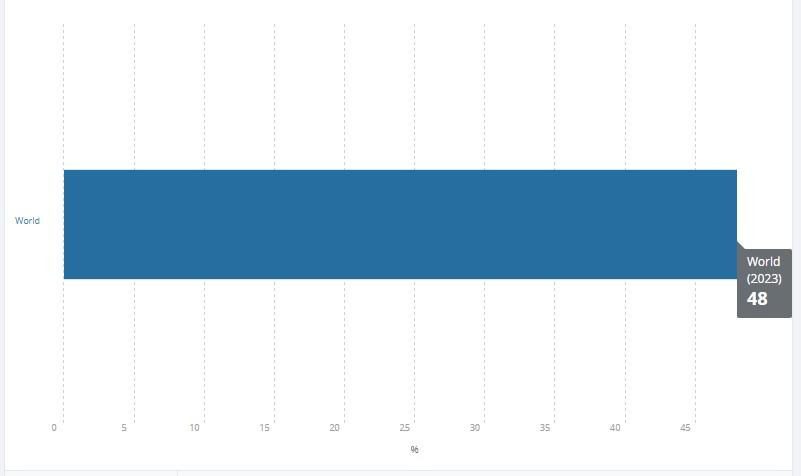
Image via World Bank
However, as 58% of freelancers admit, time management can be a huge challenge. Between juggling clients, tight deadlines, projects, and personal time, keeping everything in order takes real effort.
That’s where your freelancer productivity calendar comes in.
It creates a workflow that fits your lifestyle, keeps you focused, and helps you make the most of every day. Once I created and fine-tuned mine to match how I work, everything became smooth and more in control.
Here’s how your freelancer productivity calendar can help you do the same.
1. Define Your Core Categories
Instead of random to-dos, your freelancer productivity calendar should reflect the rhythm of your work. The best way to do that is by creating categories that match your daily responsibilities.
Try setting up sections for:
- Client Projects – Active work for each client
- Invoicing and payments – Financial tasks that keep cash flowing
- Meetings and calls – Calling existing clients and onboarding new ones, or quick syncs
- Learning and personal growth – Courses, upgrading your skills, or a creative hobby
- Marketing and networking – Professional outreach, checking and updating your social media, or reviewing your portfolio
You can then color-code each category to better visualize your week. Just one glance and you know where your focus needs to be. Personally, this approach turned my messy to-do list into a calendar that finally made sense.
2. Use Time Blocking for Deep Work
Freelancers often wear multiple hats. For instance, here are the common communication tasks and the time each consumes per day.
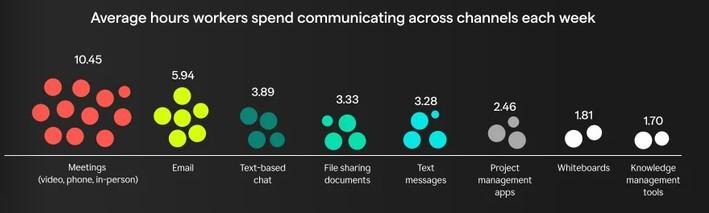
Image via Grammarly
Instead of juggling all of them at once, create time blocks to dedicate focused hours to one task at a time. Here’s a structure I like to follow:
- 9:00–11:00 AM → Client A’s project
- 11:15–12:00 PM → Respond to emails
- 2:00–4:00 PM → Marketing or admin tasks
As a freelancer, it’s tempting to multitask; I know I’m guilty of it. Not only does this reduce your productivity, but it also affects your cognition and creativity. Plus, it leads to burnout.
You can use your freelancer productivity calendar to visually map these blocks and adjust them easily if something runs long.
3. Include Breaks Like You Would Meetings
It’s easy to pack your day with client work and forget that you’re human too; no wonder 71% of freelancers experience burnout. According to scientific research, here’s how it happens.
Image via MDPI
Breaks are crucial for sustaining focus and creativity, especially in freelance life, where burnout is common.
I learned that scheduling short breaks inside my freelancer productivity calendar actually made me more productive. Try setting reminders for:
- 10-minute micro-breaks every hour to stretch or step outside
- Screen-free lunch breaks
- Mid-afternoon resets, when your energy naturally dips
The most productive people work for 52 minutes and then take a 17-minute break. That balance keeps your brain refreshed and your motivation steady. When you treat breaks as meetings with yourself, you come back sharper, calmer, and ready to finish strong.
4. Automate Repetitive Tasks Using AI Tools
Freelancers handle a lot of repeat work, such as sending invoices, checking messages, posting content, or updating client files. Instead of trying to remember everything, why not let your freelancer productivity calendar and automation tools do the heavy lifting?
Now add AI to the mix. Freelancers are using AI tools like smart schedulers or AI assistants, with the majority using it to automate various recurring tasks.
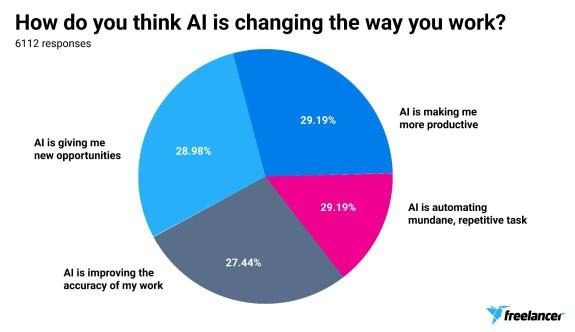
Image via Freelancer
They can even analyze your workload and suggest when you’re most productive. As a bonus, they can help boost your income by handling these routine tasks, leaving you to handle higher-paying, creative work.
5. Plan Weekly Reviews
A good freelancer productivity calendar isn’t something you set and forget. It evolves with you. So, every week, take 10 to 15 minutes to look back and assess what worked and what didn’t.
Ask yourself:
- What did I finish on time?
- Which projects took longer than expected?
- What can I adjust next week?
Also, collect and act on feedback from clients or team members so your schedule stays realistic and aligned with their needs. This short review session helps you catch small inefficiencies before they turn into habits.
6. Separate Work and Personal Calendars
Mixing client deadlines with grocery runs is a bad idea. It’s important to keep separate calendars for work and personal life so your focus is where it needs to be. I maintain one freelancer productivity calendar for my work and another for my personal schedule.
On rare occasions, I can overlay both to check for conflicts. I maintain a clean separation so I can easily switch off mentally once my workday ends. Plus, it helps avoid issues, such as accidentally booking a meeting during family time.
Over time, you’ll notice your stress levels drop because your brain isn’t constantly juggling both worlds. You’ll also find it helps boost your creativity during work hours and makes it easier to fully unwind afterward.
I use Adobe Online Calendar, a professional and easy-to-use online calendar design tool that helps me to create custom calendars and manage my daily professional and personal life.
7. Add Goals, Not Just Tasks
Your freelancer productivity calendar should reflect your bigger goals. Tasks tell you what to do, but goals remind you why you’re doing it. Add specific milestones that push you forward, like:
- Complete a new client project
- Reach a monthly income target
- Learn a new skill, tool, online course, or certification
- Update your website or portfolio
- Pitch to three new potential clients this month
Then break these big goals into smaller calendar checkpoints, making progress feel tangible. I usually set a quick “goal check” reminder every Friday to see how I’m tracking. You can even tag tasks with your goals so you know exactly what contributes to what.
This simple approach builds consistency and keeps motivation high.
8. Sync Your Calendar with All Devices
You’ve built a custom freelancer productivity calendar, so why not make it fully accessible wherever you go? Sync it across your phone, tablet, and laptop so your schedule follows you, no matter the platform you’re using.
Cross-device syncing keeps updates instant. Move a meeting, adjust a time block, or add a task on your phone, and it shows up everywhere else automatically. This prevents confusion and double-bookings, which can be a huge stressor for freelancers juggling multiple clients.
Plus, it makes remote work and on-the-go productivity much smoother. A synced freelancer productivity calendar keeps you in control, even when your workday isn’t tied to your desk.
9. Get Help When You Need It
Even the best systems can’t do everything, and that’s okay. When your schedule feels overwhelming, it might be time to hire a personal assistant or a virtual scheduler. They can manage appointments, send reminders, or keep your freelancer productivity calendar perfectly updated while you focus on actual client work.
I learned that letting go of small administrative tasks boosted my overall output far more than I expected. You don’t have to do it all; your time is better spent on what only you can do.
Sometimes the smartest productivity move is knowing when to share the load.
10. End Each Day With a Quick Recap
Before logging off, take a few minutes to look at your day inside your calendar. Review what you completed, what got pushed forward, and what tomorrow looks like. It’s a small habit that makes a huge difference in how you start the next day.
I like to jot down a short note or tag tasks I want to prioritize first. That way, I wake up knowing exactly where to begin. When your freelancer productivity calendar ends with clarity instead of chaos, mornings feel lighter and more productive.
Final Thoughts
A freelancer productivity calendar is one of the most important tools for promoting self-management. When customized right, it gives you control, keeps your freelance life balanced, and your workload under control. And since the beauty of freelancing is flexibility, a custom calendar lets you enjoy that freedom without losing focus.
So, start customizing and schedule your way to more organized, productive freelancing.




.jpg)